Hello, how can we help you?
We have answers for all your questions. Let’s verify all the information to find out where your shipment is.
Search
Common searches:
We have answers for all your questions. Let’s verify all the information to find out where your shipment is.
Common searches:
Discover everything you need to know to start your journey with our service
Discover everything you need to know to start your journey with our service
Discover everything you need to know to start your journey with our service
Discover everything you need to know to start your journey with our service
Easily create Documentation, Knowledge-base, FAQ, Forum and more
Professionally cultivate one-to-one find customer service with robust ideas.
Professionally cultivate one-to-one find customer service with robust ideas.
Find answers across various categories with top articles to guide you through

If you have configured your Help Center to support multiple languages, you can publish content in your supported languages.
Here's the workflow for localizing your Help Center content into other languages:
For complete instructions, see Localizing the Help Center.
This FAQ is a section in the General category of your help center knowledge base. We created this category and a few common sections to help you get started with your Help Center.
The knowledge base in the Help Center consists of three main page types: category pages, section pages, and articles. Here's the structure:
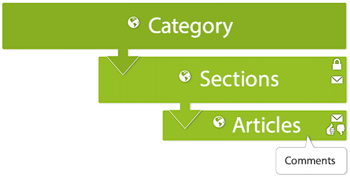
You can create your own categories, sections, and articles and modify or completely delete ours. See the Organizing knowledge base content and Creating articles in the Help Center to learn how.
You can use our Knowledge Capture app to leverage your team’s collective knowledge.
Using the app, agents can:
Agents never have to leave the ticket interface to share, flag, or create knowledge, so they can help the customer, while also improving your self-service offerings for other customers.
To get started, see our Knowledge Capture documentation.
And before your agents can start creating new knowledge directly from tickets, you’ll need to create a template for them to use. To help you along, we’ve provided some template ideas below. You can copy and paste any sample template below into a new article, add the KCTemplate label to the article, and you’ll be all set.
[Title]
Question
write the question here.
Answer
write the answer here.
[Title]
Symptoms
write the symptoms here.
Resolution
write the resolution here.
Cause
write the cause here.
[Title]
Objective
write the purpose or task here.
Procedure
write the steps here.
Comprehensive guides, tutorials, and references to help you navigate our products/services seamlessly.
Comprehensive guides, tutorials, and references to help you navigate our products/services seamlessly.
Comprehensive guides, tutorials, and references to help you navigate our products/services seamlessly.
Easily create documentation, knowledge-base, FAQ, forum and more
Lorem ipsum dolor sit amet consectetur adipisicing elit. Officia, similique.
Lorem ipsum dolor sit amet consectetur adipisicing elit. Officia, similique.
Lorem ipsum dolor sit amet consectetur adipisicing elit. Officia, similique.
Lorem ipsum dolor sit amet consectetur adipisicing elit. Officia, similique.
Lorem ipsum dolor sit amet consectetur adipisicing elit. Officia, similique.
Lorem ipsum dolor sit amet consectetur adipisicing elit. Officia, similique.
Lorem ipsum dolor sit amet consectetur adipisicing elit. Officia, similique.
Lorem ipsum dolor sit amet consectetur adipisicing elit. Officia, similique.